Epson EcoTank L3250 Review – A Smart Choice for Everyday Printing?

If you are planning to buy a printer for regular use, the Epson EcoTank L3250 is one of the safest choices right now. It is designed for people who print frequently and want to avoid the high cost of cartridges.
This printer combines printing, scanning, and copying in a compact body, while also adding WiFi connectivity for modern users. On paper, it looks like a complete package. But in real-life use, does it actually deliver good value? Let’s go through everything in detail.
Quick Overview (At a Glance)
Type: All-in-One InkTank Printer
Functions: Print, Scan, Copy
Connectivity: USB + WiFi + WiFi Direct
Print Speed: Up to 33 ppm (Black), 15 ppm (Color)
Best For: Home users, students, small offices
Highlight: Ultra-low printing cost

Epson EcoTank L3250
High-yield printing, wireless convenience, and all-in-one performance for everyday needs.
- High-yield EcoTank prints thousands of pages per refill
- Piezo inkjet delivers sharp text and vibrant colors
- Print, scan, and copy in one compact machine
- Wireless printing from phones and laptops easily
- Epson Smart Panel app for simple control and setup
Design & Build Quality
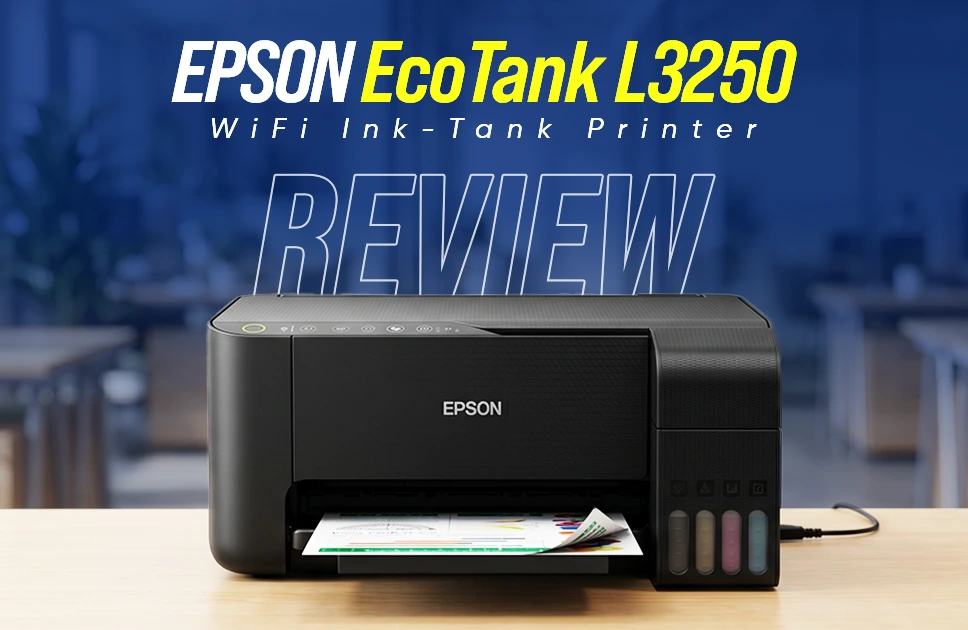
The design is simple, clean, and practical. Epson did not try to make it flashy, and that actually works in its favor. The body is compact enough to fit on a study table or office desk without taking much space. At around 3.9 kg, it is lightweight and easy to move when needed.
One of the most useful design choices is the front-facing ink tank. You can easily monitor ink levels without opening anything. This small detail makes daily use much easier. And there is no display panel here. Everything is controlled using buttons or the mobile app. At first, this might feel basic, but after a few days of use, it becomes normal.
Print Performance & Quality
First of all, regarding speed, this printer is rated at 33 ppm for black and 15 ppm for color printing. In real-world use, you can expect slightly lower speeds, especially when printing high-quality documents. For normal documents, assignments, and office files, the speed is more than enough and feels smooth.
Printing quality is decent, actually. The printer delivers a resolution of up to 5760 × 1440 dpi, which is quite impressive for its price range. Text comes out sharp and clean, and colors look lively enough for everyday printing. Graphics and charts also turn out well with clear details. It’s not meant for professional photo work, but for casual photos and regular documents, the overall print quality feels more than satisfying. You can print borderless photos up to 4R size. This is useful for printing personal photos at home without needing a photo lab.
Read More: Epson EcoTank L130 Printer Review
Scan & Copy Performance
Epson EcoTank L3250 uses a flatbed scanner with up to 1200 × 2400 dpi resolution, which is quite suitable for everyday needs. In real use, scanning quality comes out clear and sharp enough for documents, class notes, and regular office files. Text remains readable, and even scanned images look decent for basic use.
Copying is simple and works without any complications, offering a standard 600 × 600 dpi resolution. The output is consistent for normal documents and quick copies.
This printer is not designed for professional image editing or high-end graphic work, but for daily scanning and copying tasks, it does its job reliably without any hassle.
Connectivity & Smart Features
One of the biggest advantages of Epson EcoTank L3250 over older models is its wireless flexibility. It supports USB, WiFi, and WiFi Direct, giving you multiple ways to connect depending on your setup.
With Epson Smart Panel app, you can handle most tasks directly from your smartphone. Printing documents, scanning files to your phone, and even setting up the printer can all be done without needing a computer.
This makes daily use much more convenient, especially for users who prefer working from mobile devices. Overall experience feels smoother and more modern compared to traditional USB-only printers.
Ink System & Cost Efficiency
Main reason behind the popularity of the Epson EcoTank L3250 is its cost-saving ink system. Instead of traditional cartridges, it uses refillable ink bottles, which significantly lowers printing expenses over time.
Page yield is impressive, offering up to 4,500 pages for black and 7,500 pages for color. For students, small businesses, or anyone with regular printing needs, this results in noticeable long-term savings.
Refilling ink is also simple and clean, thanks to the spill-free bottle design. Even first-time users can manage it without any mess. Over time, savings on ink make a big difference and add strong value to the overall investment.
Paper Handling
Support for a wide range of paper sizes makes the Epson EcoTank L3250 flexible for different types of tasks. It can handle A4, Legal, Letter, and various photo sizes without any issue, which is useful for both document printing and occasional photo work.
Input capacity stands at 100 sheets, while the output tray can hold up to 30 sheets. For everyday home use or a small office setup, this capacity feels comfortable and does not require frequent refilling.
For heavier workloads with continuous bulk printing, limitations may start to show. But for regular use like assignments, office documents, or light business tasks, performance remains smooth and manageable.
Power Consumption & Efficiency
Energy usage on the Epson EcoTank L3250 stays quite low, making it a practical option for long-term use. During operation, it consumes around 12W, which is reasonable for a multifunction printer.
Power usage drops significantly in standby and sleep modes, helping reduce unnecessary electricity consumption when the printer is not actively in use.
This level of efficiency makes it suitable for daily use without adding noticeable pressure on electricity bills, especially for users who print frequently.
Read More: বাজেটের মধ্যে সেরা প্রিন্টার
Epson L3250 vs L3210 (Quick Comparison)
Comparison with Epson EcoTank L3210 makes sense because it is one of the previous models from Epson, and the price is also very close to the mentioned model. Both models are widely used in Bangladesh and target the same type of users, including students and small offices. Price difference is also quite small, which is why many buyers get confused between these two. A quick side-by-side comparison helps make the choice much clearer.
| Feature | Epson EcoTank L3250 | Epson EcoTank L3210 |
| Functions | Print, Scan, Copy | Print, Scan, Copy |
| Print Technology | Inkjet (Piezoelectric) | Inkjet (Piezoelectric) |
| Print Resolution | 5760 × 1440 dpi | 5760 × 1440 dpi |
| Print Speed | 33 ppm (Black), 15 ppm (Color) | 33 ppm (Black), 15 ppm (Color) |
| Scan Resolution | 1200 × 2400 dpi | 600 × 1200 dpi |
| Copy Resolution | 600 × 600 dpi | 600 × 600 dpi |
| Connectivity | USB + WiFi + WiFi Direct | USB only |
| Mobile Printing | Yes (App supported) | No |
| Ink Yield | 4500 (Black), 7500 (Color) | 4500 (Black), 7500 (Color) |
| Paper Capacity | 100 input / 30 output | 100 input / 30 output |
| Duplex | Manual | Manual |
Epson L3250 Price in Bangladesh
Price of Epson EcoTank L3250 in Bangladesh usually falls within the range of around ৳18,500 to ৳21,000, depending on availability, stock, and ongoing deals.
If you are planning to order online, Apple Gadgets is a reliable option to check. You can explore the latest price, confirm product authenticity, and get proper after-sales support, which makes the whole buying process smoother and more secure.
At The End
Epson EcoTank L3250 focuses on real everyday needs rather than extra fancy features. It delivers strong print quality, reliable scanning, and easy copying, all while keeping printing costs extremely low.
What makes it even more useful is the addition of WiFi and mobile printing support, which removes the hassle of always depending on a computer. It feels simple, practical, and very beginner-friendly, especially for students, home users, and small office setups.
It does have a few limitations like the lack of a display screen and manual duplex printing, but those are not deal-breakers for most users. At this price range, it still offers solid value for money.
If you are looking for a long-term printing solution that saves money and works without complications, the L3250 is definitely a safe and smart choice.
Borhan Uddin Alif is a writer with 3 years of experience, focusing on technology, marketing, and storytelling, and enjoys exploring various niches and topics.