Epson EcoTank L3210 Printer Review: A Practical Choice for Home and Small Office

The Epson EcoTank L3210 has made an impression in the printer market by offering both affordable and all-in-one printing solutions. Its most notable product is the new EcoTank system that substitutes the expensive ink cartridges with big and refillable ink tanks. This article covers the L3210’s design, performance, and overall value.
Technical Specifications
| Specification | Details |
| Model | Epson EcoTank L3210 |
| Functions | Print, Scan, Copy |
| Print Technology | Epson Heat-Free Technology (Piezoelectric) |
| Print Speed (ISO) | Black: up to 10 ipm · Color: up to 5 ipm |
| Print Resolution | Up to 5760 × 1440 dpi |
| Page Yield | Up to 7,500 pages (Black) · 4,500 pages (Color) |
| Scanner Type | Flatbed CIS Color Scanner |
| Scan Resolution | 1200 × 2400 dpi (Optical) |
| Paper Size Support | A4, Letter, Legal, common photo sizes |
| Mobile App | Epson Smart Panel |
| Connectivity | USB 2.0 |
| Operating Systems | Windows XP/Vista/7/8/8.1/10, Mac OS X 10.6.8 or later |
First Impressions and Design
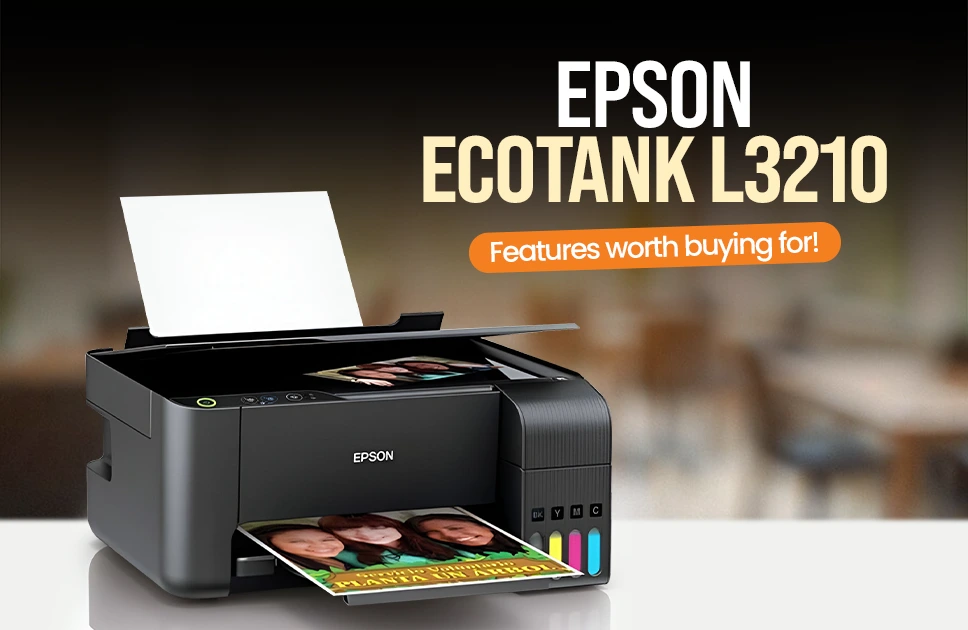
L3210 is a compact design with a modern matte black finish which suits well both at home and at the workplace environment. The ink tanks are situated on the side unlike the traditional printers, which utilize cartridges and it is easy to see the ink tanks on the EcoTank. The printer is durable and small enough to fit on the majority of desks, and the flatbed scanner and paper tray allow it to be user-friendly. It is easy to set up and the only disadvantage is that the initial fill of ink would require approximately 15-20 minutes.
The EcoTank Advantage: Cost Savings That Matter
Among the strongest points of the L3210 is the EcoTank system.Its four refillable ink bottles replace the costly ink cartridges. The set of bottles will be able to print up to 4,500 pages in color and 7,500 pages in black, which will save a lot of money in the long term.
Moreover,the ink refill is a hassle free activity. The nozzles in each bottle are specific and it can only fit in the specific tank hence no mix-ups and spills.
Print Quality and Performance
The L3210 provides quality print of documents as well as photos. Text documents are sharp and clear, and there is good contrast in the documents and there is no smudging. The printer is capable of printing normal office papers easily and thus it can be used to print reports, assignments, invoices and any other business documents.
In case of color printing, the results are acceptable. The graphics and colored documents can be somewhat processed with the help of the printer. Its colors are bright enough to be used in everyday life, but a professional photographer would say that they are somewhat less precise than the expensive models.
One of the notable features of the L3210 is the photo printing. Its printer can be used to do borderless printing up to 4R and this is ideal in printing photos at home. The output is very impressive when the premium glossy photo paper of Epson is used. The images are well reproduced in terms of colour and details. Photos are however time consuming to print. It requires approximately 90 seconds in a single 4×6 inch borderless photo and therefore you have to be patient in case you are printing more than one photo.
Speed and Efficiency
Although the L3210 can reach fairly good speeds as preferred by most home and office, it is a little slow when it comes to printing in large volumes. The rate of black-and-white print stands up to 10 pages per minute (ppm) in the standard mode whereas the color print is even slower at 5 ppm. These speeds rise to 33 ppm with black and 15 ppm with color in draft mode with a significantly inferior quality of the print.
First page out time also is not bad, with black prints of 10 seconds and color of 16 seconds. These speeds are quite sufficient when used by an average home user or a small office, unless you are used to printing large quantities of items, when they may be considered too slow.
Scanning and Copying
The L3210 also has a flatbed scanner which can be used in simple scanning. The scanner has a resolution of 1200 x 2400 dpi, which makes it give a good quality of scans to both documents and photos. A page scanned with black and white takes about 32 seconds, whereas a color scanned page requires 11 seconds.
The L3210 can easily be copied but there is no automatic document feeder (ADF) so you have to insert each page separately to scan or copy. The copying quality is like the print quality, which can be used in duplicating documents.
Connectivity: A Notable Limitation
The biggest drawback of the L3210 is its lack of wireless connectivity. It is only compatible with a computer through USB 2.0 which may be inconvenient to users who may require to print using several devices, e.g., laptop, smartphone, tablet, etc. This might feel outdated to many especially in the wireless era.
The Epson Smart Panel app is not completely functional as it lacks wireless capability. This might not be a dealbreaker to those who can only print on the basis of a single desktop computer. But when you have to print using other devices, then the unavailability of Wi-Fi may be annoying.
Maintenance and Reliability
The L3210 has the Heat-Free Technology of Epson, and this saves power and minimizes wear on components. This also minimises the exposure to failure caused by heat stress. The printer is also dependable in the normal domestic or small office work.The maintenance is also low, it is only necessary to run a printhead cleaning cycle occasionally, to sustain the maximum functionality.
Software and User Experience
The L3210 is compatible with Windows XP through Windows 10 and Mac OS X 10.6.8 or later.It is easy to install and mostly the printer is recognized by the various operating systems. Epson Smart Panel application has a well-organized interface on simple operations, but its capabilities are not extensive because of the absence of wireless printing.
The disadvantage is that the printer is a bit noisy when in use, particularly in a quiet room. The paper feeding system has also been sensitive to very thin or thick papers, however, it has no problem with the usual copy paper.

Epson EcoTank L3250
A4 Wi-Fi multifunction EcoTank printer built for high-yield everyday printing.
- High-yield EcoTank prints thousands of pages before refill
- Piezoelectric inkjet delivers sharp text & vibrant graphics
- Print, scan & copy in one compact machine
- Wireless printing from phones and laptops with ease
- Epson Smart Panel app simplifies setup and daily control
Who Should Buy the Epson L3210?
The L3210 will be suited to a few uses. The low running costs will mean much to students who have to print out assignments at a frequent rate. Small businesses which print invoices, receipts and documents will be very much valued. It will also be of benefit to home users who wish to print photos occasionally without necessarily spending a lot of money on the ink.
However, the L3210 doesn’t come with a wireless printing so if you want that you can go for a bit costly device like L3250 or L3252 models. So, rather than a regular household if you are a professional photographer it is suggested to use other models with higher quality for superior color accuracy.Commercial grade equipment may be necessary in businesses that demand very high speed and large volumes of printing.
Final Verdict
The Epson EcoTank L3210 delivers excellent value for budget-conscious buyers. The low cost per print and reliable performance make it an attractive option for home and small office use. The print quality is good for everyday documents and photos, and the compact design is ideal for tight spaces. The biggest drawback is the lack of wireless connectivity, which may be a dealbreaker for some users.
If you can work within this limitation, the L3210 offers tremendous savings and solid performance. For anyone looking for affordable, efficient printing without the high cost of ink cartridges, the Epson EcoTank L3210 is highly recommended from Apple Gadgets your online shoping store.
Mohammad Shariful Islam is the CEO and MD of Apple Gadgets, a leading e-commerce and retail chain for gadgets in Bangladesh. He has a passion for technology, entrepreneurship, and holds a decade of experience in gadget E-Commerce. He’s committed to providing the best possible shopping experience for customers by delivering the latest and trendy gadgets.