Smart TV Vs Android Tv: Key Difference & Comparisons

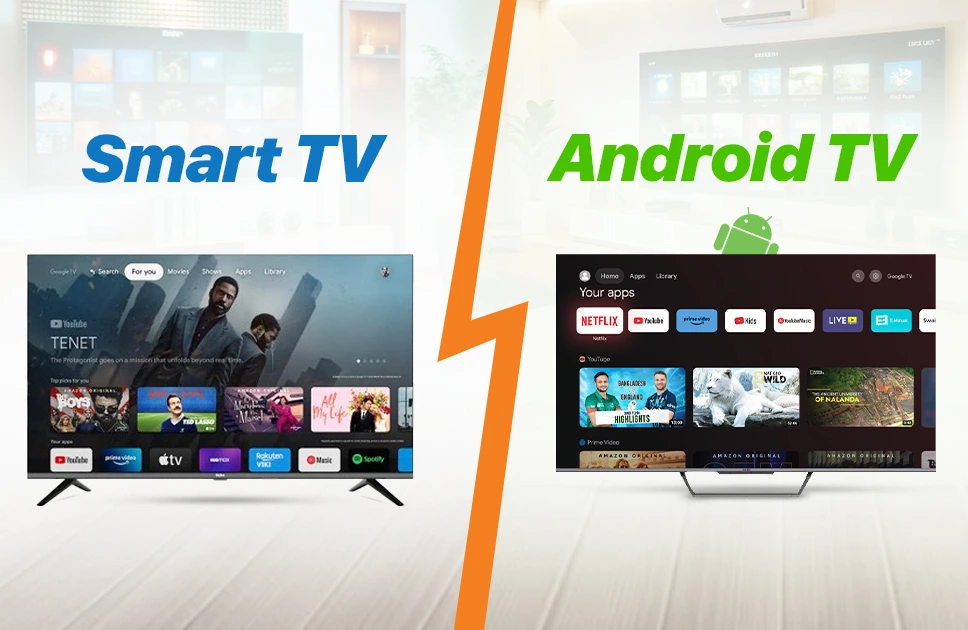
In this era of smartphones and laptops, one thing that will never fall behind is the TV. To be honest, TV is no longer just a box for watching cable channels. TV is now smart enough to connect to the internet, stream your favorite shows and even run apps just like your phone. But here comes the big question Smart TV or Android TV? Both sound similar, right? But they are not the same. If you’re in the same situation, unable to decide which one to buy, worry not, because I will break it down for you. Today, we will discuss the differences between Smart TV and Android TV so you can understand their features and choose the one that fits your needs.
What are Smart TV and Android TV?
Before exploring the differences, let’s understand what makes Smart TVs and Android TVs unique and how each brings a smarter, more convenient entertainment experience into your living room
What is a Smart TV?
Imagine coming home after a long day and wanting to watch your favorite show on Netflix or YouTube without switching devices—this is where a Smart TV helps. A Smart TV is simply a television that can connect to the internet and run apps without needing extra devices. Most Smart TVs come with a set of built-in apps like Netflix, Prime Video, and YouTube, so you can start streaming right away. Each brand uses its own operating system — for example, Samsung uses Tizen OS and LG uses webOS.
The coolest part is some Smart TVs have voice control, so you can say ‘Play my workout video’ hands-free while you cook or exercise. Smart TVs make entertainment, learning, and staying connected easier and more convenient in everyday life. However, Smart TVs often have limited app choices since you can only download from the TV brand’s own app store. Overall, we can say Smart TVs are perfect if you only need basic streaming and do not want too many extra settings.
What is an Android TV?
Now, come to the Android TV. An Android TV is also a Smart TV, but it uses Google’s Android operating system. This means it has access to the Google Play Store, letting you download thousands of apps and games just like you do on your phone. Android TVs also have Google Assistant built in, which allows you to control the TV with your voice, search for shows, or even manage smart home devices. Another bonus is Chromecast support, so you can easily cast videos, music, and photos from your phone or tablet to the TV screen.
Android TVs get regular updates from Google, which means better security and new features for a longer time. If you already use Android phones or Google services, the interface will look very familiar to you. Especially if you want more support for apps, voice, and extended support, go for Android TVs.
Read More: Best TV Brands in Bangladesh
Key Differences Between Smart TV and Android TV
Now that we understand what Smart TVs and Android TVs are, it’s easier to see how they differ in detail. So, let’s know the key differences to help you pick the best TV for you.
Operating System
Different brands build their own software for Smart TVs which means features can vary. Android TVs run on Google’s Android platform, giving you a familiar interface similar to an Android phone with access to Google services and a more unified experience across devices.
App Availability
When you compare app options, Smart TVs usually have a limited set of pre-installed apps with a smaller app store. Android TVs give you access to Google Play Store which offers thousands of apps, games, and streaming services to choose from easily.
Updates
Most Smart TVs do not receive frequent updates which can make them feel outdated over time. Android TVs get regular updates from Google that improve performance, fix bugs, and bring new features so your TV feels fresh and stays current longer.
Voice Control
Hands-free control can make a big difference. Android TVs come with Google Assistant built in, letting you search for content, open apps, and control smart home devices with your voice. Regular Smart TVs might offer only basic voice features or sometimes none at all.
Customization
Some people like personalizing their TV experience. Android TVs allow you to customize the home screen, rearrange apps, and even install third-party or sideloaded apps. Smart TVs have fixed layouts and limited personalization so you get fewer options to make it feel unique.
Performance
Performance is another area where you may notice a difference. Some Smart TVs can feel slow because of limited software optimization. Android TVs are designed to run heavier apps smoothly, handle multitasking, and deliver a more responsive experience when switching between apps or services.
Connectivity
Casting and sharing content is easier on Android TVs thanks to Chromecast built-in which lets you cast from your phone with a tap. Smart TVs usually just offer basic Wi-Fi and Bluetooth features with limited support for wireless casting from other devices.
User Experience
Watching shows and movies feels different on each. Smart TVs work well for simple streaming but have fewer features. Android TVs offer a smarter experience with personalized recommendations, advanced search options, and smooth navigation that feels closer to using a modern smartphone.
Price
Budget is always a key factor. Smart TVs usually cost less and are good for basic streaming needs. Android TVs may be slightly more expensive but you get better features, access to more apps, and longer software support making them worth the price.
Read More: Difference Between QLED and OLED TV
Advantages and Disadvantages of Smart TV vs Android TV
Both Smart TVs and Android TVs come with their own set of benefits and drawbacks. Knowing the advantages and disadvantages of each can help you pick the right TV for your needs. Let’s know the advantages and disadvantages of Smart TV and Android TV in detail:
| Feature | Smart TV | Android TV |
| Advantages | Easy to use with built-in apps | Access to Google Play Store with thousands of apps |
| Simple interface for beginners | Regular updates for apps and system | |
| Can stream popular services like Netflix, YouTube | Voice control via Google Assistant | |
| Often cheaper than Android TVs | Chromecast built-in for easy screen sharing | |
| Energy-efficient models available | Better integration with other Android devices | |
| Wide brand options | Customizable home screen and apps | |
| Disadvantages | Limited app store and fewer updates | Can be more expensive than regular Smart TVs |
Verdict
I hope now I have a clear idea of the differences between a Smart TV and an Android TV. If you want something simple and easy to use, a Smart TV is the way to go. It comes with popular apps like Netflix, YouTube, and Prime Video ready to use, making streaming effortless without worrying about updates or extra settings.
If you prefer more flexibility, control, and advanced features, an Android TV is the smarter choice. With access to the Google Play Store, Google Assistant, Chromecast, and regular updates, it lets you customize your home screen, download more apps, and connect seamlessly with other Android devices. And check out the latest Smart and Android TVs at Apple Gadgets and find the perfect one for your home today.
FAQ
Which TV is better for gaming and streaming?
Android TV usually performs better for gaming and streaming because it has more apps, better support for Google services, and features like Chromecast built-in. Smart TVs work well for casual streaming but may have fewer advanced options.
Do Smart TV and Android TV get regular updates?
Smart TVs may get updates, but they depend on the TV brand and can be limited. Android TVs get regular updates from Google, keeping apps, security, and features up-to-date more reliably.
Which is best, a Smart TV or an Android TV?
It depends on your needs. If you want a simple TV for watching shows and streaming with easy use, a regular Smart TV is enough. But if you want more apps, better gaming and streaming options, voice control, and regular updates, an Android TV is the better choice. Android TV gives a more flexible and feature-packed experience for tech-savvy users.
Mohammad Shariful Islam is the CEO and MD of Apple Gadgets, a leading e-commerce and retail chain for gadgets in Bangladesh. He has a passion for technology, entrepreneurship, and holds a decade of experience in gadget E-Commerce. He’s committed to providing the best possible shopping experience for customers by delivering the latest and trendy gadgets.